VAULTSCRUB FOR IPHONE & IPAD
Share the screenshot.
Keep your details private.
Hide names, numbers, and anything else you don’t want others to see. Then paste your screenshot into an AI chat, message, or email.
For iPhone and iPad. Free to download.
Free basic tools · No account · Editing stays on your device
A LITTLE LESS PERSONAL
Keep the useful part.
Cover the private part.
A receipt, a booking, a conversation. Share what you need help with, while keeping your private details out of the picture.
BEFORE · PRIVATE DETAILS VISIBLE
Your order is on its way.
Send updates to
jamie@example.com
Phone number
(312) 555-0142
AFTER · READY TO SHARE
Your order is on its way.
Send updates to
Phone number
Illustration using made-up information. Hidden areas become solid black in the image you copy or share.
40 seconds · No sound needed · Illustrated guide
START IN PHOTOS
Share a screenshot.
Keep private details out.
1. Open the Share menu
In Photos, open one screenshot and tap Share — the square with an arrow pointing up.
2. Choose VaultScrub
Swipe up in the Share menu. In the list of actions, tap Scrub with VaultScrub.
3. Hide private details
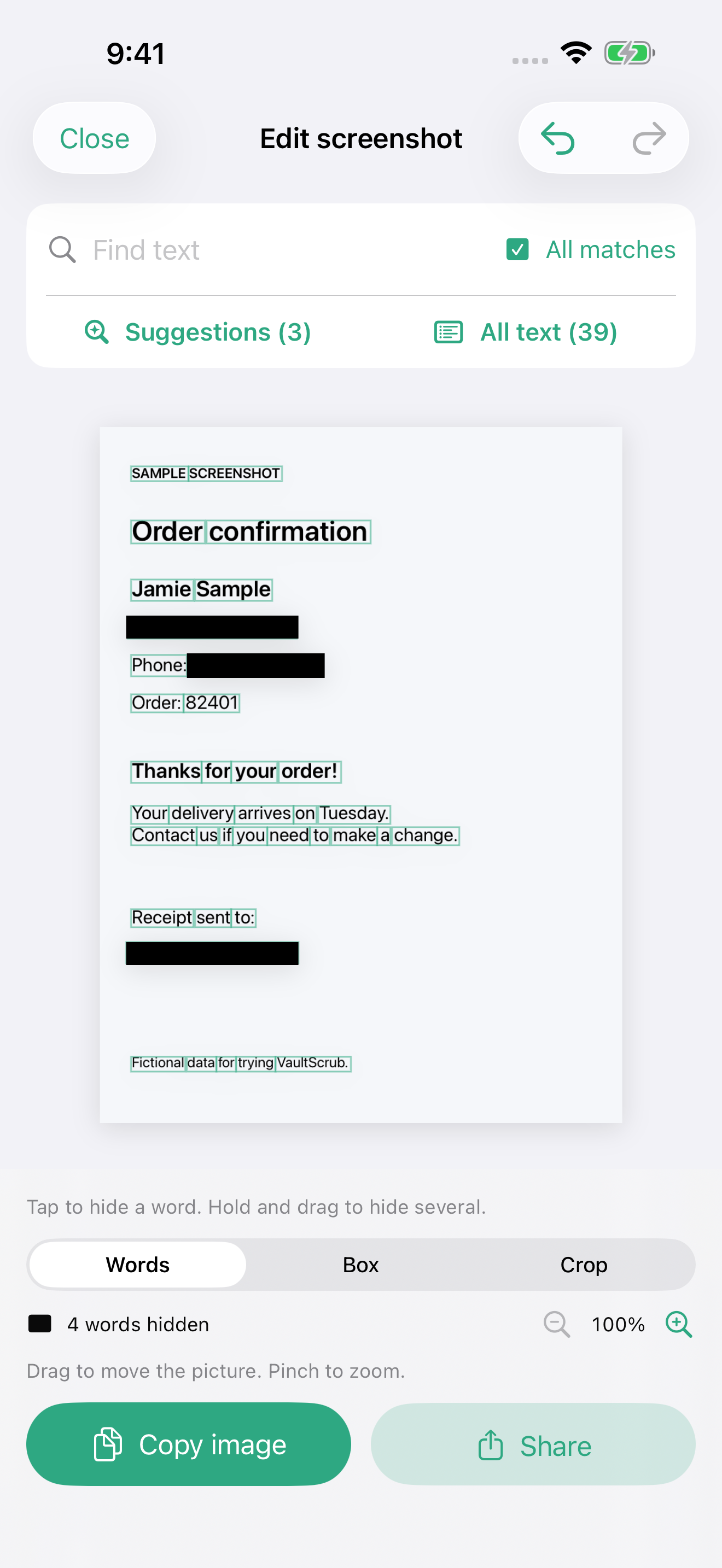
Tap a word to cover it. To hide several words, hold a word briefly, then slide along its line. Use Box to cover anything else.
4. Check, copy, and paste
Check the whole picture. Tap Copy image, then open your chat, touch and hold where you type, and choose Paste. Or tap Share to send your edited copy. Your original stays unchanged.
Can’t find VaultScrub in the Share menu?
Make sure VaultScrub is installed and you are sharing one picture. Scroll down to Edit Actions and add Scrub with VaultScrub if it is listed. You can also open VaultScrub and tap Choose screenshot or photo.
Free for everyday screenshots.
Hide details yourself for free. Pro helps you find them faster.
Free
$0 forever
- Hide words or whole lines
- Cover any area with a black box
- Find and hide repeated text
- Crop, zoom, undo, and redo
- Copy and share as often as you like
- No watermarks or account needed
OPTIONAL UPGRADE
VaultScrub Pro
$4.99 once
- Suggestions
Find email addresses, phone numbers, and other private details to review. You choose what to hide.
- My private text
Save names, addresses, or numbers you often hide. VaultScrub looks for them in your screenshots.
Try Pro on five screenshots for free. The built-in example is always free to try.
One payment for iPhone and iPad. No subscription.
Desktop version sold separately.
US price. Local prices vary. Upgrade inside the app.
YOUR PICTURES STAY YOURS
Edit on your device.
Share when you’re ready.
VaultScrub reads and edits your screenshot on your iPhone or iPad. Your original stays unchanged. Copy and Share use a new image with the selected details covered.
Always check the finished picture. Suggestions can miss things. Once you copy or share it, your device settings and the app you send it to control that copy.
Can I paste into an AI chat?
Yes. Tap Copy image, then paste into an app that accepts pasted images. You can also use Share or save the edited picture and attach it.
Can someone uncover the black areas?
The selected areas are replaced with solid black in the copied or shared image. They are not removable stickers. Check that every detail you want hidden is fully covered.
Does this include the desktop version?
No. Pro for iPhone and iPad and the desktop Pro license are separate purchases.